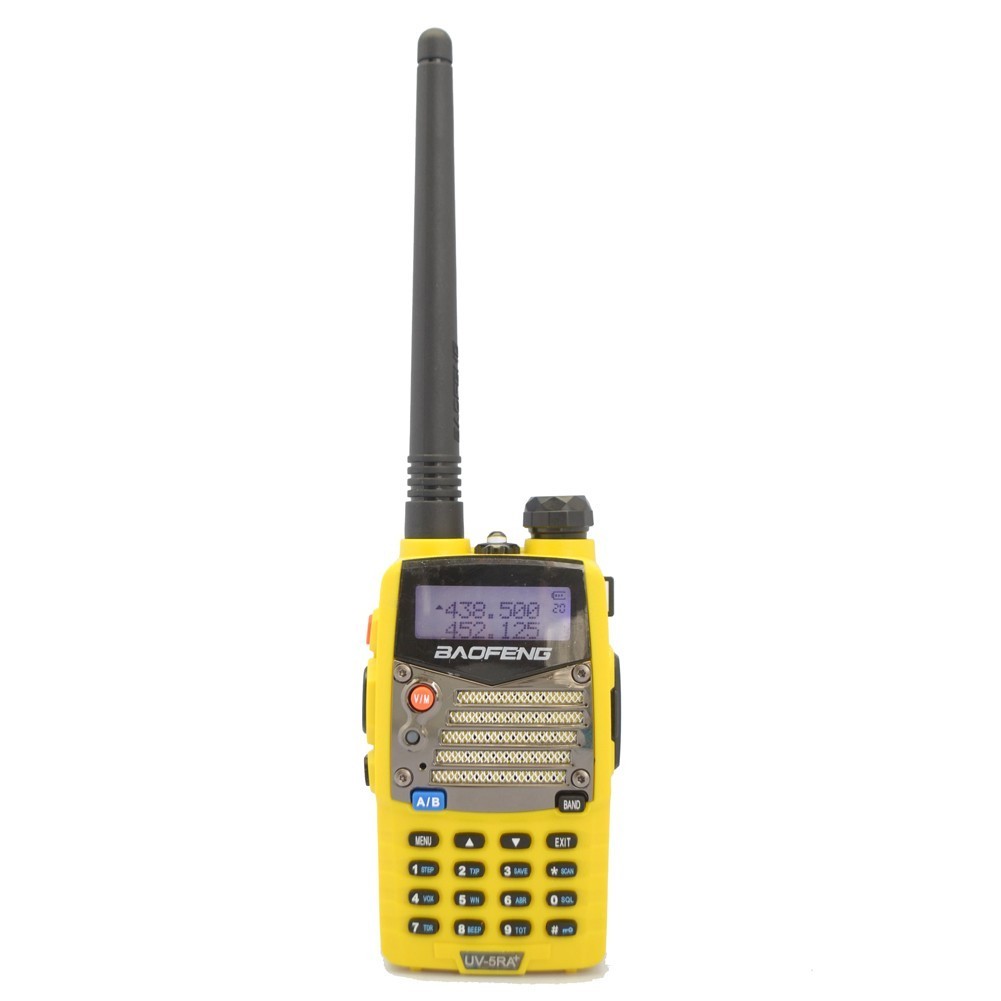
But first a quick disclaimer: As this is an international forum, the adaptation or use of these radios as I am about to describe may be legal, semi-legal, highly illegal, or get you sent to a labor camp, depending on where you are. I will not be held responsible if you wake up to find yourself naked in some bamboo tiger cage blowing up Happy Fun Balls® under the brutal direction of Evil Major Kwan (Don't miss my forthcoming feature story, "Escape from the Ball Pit of Hєll" in the next issue of Real Man Adventure magazine). Also, the marine and NOAA Weather Service frequencies described are those in use here in the Land of the Plastic Spork, so if you're cruising some moonlit lake near Ulaan Bator, your mileage may vary. With all that understood, let us proceed...
Ham and amateur radio guys really dig on these little transceivers for their low price and programmability, and even have a fairly active Yahoogroups forum concerning them. Be forewarned though, after our informative, genteel and ultra-supportive forums, that Baofeng UV-5R Yahoogroup might strike you like you've wandered into some Tourette's Syndrome Support Group. Ironically, it seems that ham radio folks--devoted to the technology and practice of reaching out and communicating with others--turn out to be some of the nastiest and most outright abusive gits on the Internet...particularly to noobs in their midst. Go figure. I mean, I sort of get it: they are encountered near daily by what must seem to them as stupefyingly elementary questions from sub-moronic dumbasses, but those guys go right to Defcon 1. Just make sure to don those flame-retardant underoos if you choose to walk in their midst, is all I'm saying. With that said, unlike most ham operators, who'll routinely program and reprogram these little radios many many times to meet changing circumstances, we're just going to pretty much set and forget a roster of fixed frequencies and channels. In fact, if all goes well, I will have already done the hard part for you, namely assigning the right frequencies to the right channels and putting them all into a nice easy single downloadable file that you can upload right into your radio. So, let us proceed...
Obviously, you will need a Baofeng UV5R radio. Again, try to find a "UV5RA+" model, if you can. Amazon always has several vendors offering them, but eBay's probably your least expensive source. While you're there, you will also need a special little USB-to-dual prong programming cable to connect it to your computer. Oddly enough, though the radios ship with a nice charger stand, AC adapter, battery and earphones, they do not come with a programming cable. You see, in theory you can program the thing right from its faceplate buttons, but in practice, a little freebie program for your computer called CHIRP is just WAY better for what we're doing. Don't worry about the little software mini-CD that comes with some cables. You won't be using it. Instead, download and install a free open source copy of CHIRP from http://chirp.danplanet.com/projects/chirp/wiki/Home to suit whichever type of computer you'll be using (they offer Windows, Apple and Linux flavors). Tossing them a buck or two via PayPal through their website's "Donate" button at the top of the Downloads page would be good form.
OK, assuming you've got everything you need, or it's on its way, you might do well to get yourself a decent manual for the Baofeng UV5R just to familiarize yourself with it. You'll find several choices over at http://www.miklor.com/uv5r/UV5R-Manuals.html. The original one, a copy of which also comes with the radio from China, ain't the worst I've ever seen of the Sino-Gibberish tech manual translation genre, but then you probably won't love it long time, either. "The (Chinese) Radio Documentation Project" manual available here is far better. The same folks who host these manuals have lots of other info on this breed of radio and related "hammy" topics at http://www.miklor.com/uv5r/. But for our "Making a Cheapo Marine Radio" purposes, we just need to do the following:
- Assemble and fully charge radio as per its instructions
- Start up the CHIRP program
- Connect programming cable to computer's USB port and its dual-pin plugs into dual headphone jacks of radio, making sure to press them in FIRMLY
- Save a backup of the radio's factory-preset settings/channels (just in case). To do this in CHIRP, from its upper menu choose "Radio" then "Download from radio". A little window should then pop up asking for Port, Vendor and Model. First, for Vendor choose "Baofeng", then for Model choose "UV-5R". The Port is the only slightly tricky part, since it depends on what USB port you plugged the programming cable into. Port choices like COM1 through COM6 may appear in its little window, though usually only those ports in use by any device will be shown. You'll just have to repeat this and the couple of mini-steps that follow until you identify the right COM port to your radio. When it finally works you'll know. Click that <OK> button. A scary-looking advisory about some "experimental driver" may appear, asking if you wish to proceed. Fear not and click <Yes>. Next a window of instructions will appear. Make sure all instructions are met and click <OK>. If a message stating "An error has occurred" appears, it just means you chose the wrong COM port, so repeat with a different choice (and remember it...You'll need it later for the upload)
- Like I said above, once you choose the right COM port you'll know. You can now download and save the radio's channel and other settings as a single file to your hard drive. A new folder named "BaofengRadioSetups" might be a good place to squirrel this backup file away, so go ahead and do that. For example, you could call it <OriginalSettings.img>. It's just insurance in case things don't work out as easily as we'd hope.
- Now go online to http://www.amphicar.net/Baofeng/ and download the file listed there named <BaofengMarineRadioSettings.img>, perhaps saving it into that "BaofengRadioSetups" folder you created.
- Now it's time to upload that <BaofengMarineRadioSettings.img> into the radio using the CHIRP program. So, in its top menu choose "File" then "Open" and navigate to wherever you put the file (possibly that "BaofengRadioSetups" folder?) and double-click it. CHIRP's screen should fill up with lots of rows and columns of numbers and other stuff. These are the channel and frequency settings. You're welcome.
- Now in the CHIRP upper menu choose "Radio" and "Upload to radio". Remember that COM Port number? Good. Proceed similarly to the earlier download of the radio's original settings. If all is well, a little progress bar should tell the tale as it "clones" the new settings to the radio. When it's done you should have a fully-functional if perhaps semi-legal handheld marine radio with all the transceiver channels (send and receive), the NOAA Weather Radio channels (receive only), and if you just want the ball scores, just press the little "Call" button once on the upper lefthand side and it'll receive regular FM broadcast stations.
At the risk of becoming everyone's technical support bitch, if it's all just too baffling you can PM me, and we can take it from there (or perhaps your true deepest fears may be realized as I merely point and laugh derisively at your distress, cruelly mocking your lack of manly technical prowess as unfitting for the pages of Real Man Adventure magazine). In a real pinch, I guess you could just mail me the radio. But happy thoughts: Everything probably will work out just fine. I've modded two of these Baofeng UV5RA+ radios from different vendors, and they both work just great. They're real handy for monitoring Channel 16 or getting a quick weather report in the cockpit, and I don't need to dive into the cabin, where my boat's main fixed Standard Horizon marine radio is installed. They might also be handy for dingy-to-boat or dock-to-boat communications. In any event, a backup marine radio's always a fine thing to have handy. Sure, my hunch is these Baofengs are not really all that waterproof, and I don't think they'll float, but for only $20 or so a pop, who cares? Live a little.