

Sailing with technology - Ipad
-
Phil M

- Captain
- Posts: 807
- Joined: Sun Jun 08, 2008 9:29 am
- Sailboat: Other
- Location: 44' Jeanneau, Saskatoon, SK, Canada
Sailing with technology - Ipad
Although I am specifically referring to the Ipad3 with is GPS capability, any similar device will do. The old rule of thumb to always carry paper charts as a backup in case something goes haywire with your chartplotter - is no longer valid. The electronics for the IPad are completely independent of the chartplotter, and if something goes wrong with your boat's electronic systems, your IPad is the backup. Add in such things as Active Captain, and the ability to hold many dozens of paper charts in one device, the argument can be made that such a tablet is BETTER than having paper charts stashed in a locker somewhere down below.
-
robbarnes1965

- Captain
- Posts: 563
- Joined: Thu Apr 03, 2008 7:58 am
- Sailboat: MacGregor 26M
- Location: (BYC)Montreal, Qc Macgregor 26m-2007 "Miss Coco" - after my daughter, 50hp Honda
Re: Sailing with technology - Ipad
Agreed.Phil M wrote:Although I am specifically referring to the Ipad3 with is GPS capability, any similar device will do. The old rule of thumb to always carry paper charts as a backup in case something goes haywire with your chartplotter - is no longer valid. The electronics for the IPad are completely independent of the chartplotter, and if something goes wrong with your boat's electronic systems, your IPad is the backup. Add in such things as Active Captain, and the ability to hold many dozens of paper charts in one device, the argument can be made that such a tablet is BETTER than having paper charts stashed in a locker somewhere down below.
-
Sumner

- Admiral
- Posts: 2375
- Joined: Sun Jan 04, 2009 3:20 pm
- Sailboat: MacGregor 26S
- Location: SE Utah
- Contact:
Re: Sailing with technology - Ipad
I think it depends. Inland Lakes and other areas where you sail in repeatedly I'd use whatever I felt good about. I found some half-a** maps/charts to where we went in Idaho/Canada and some better for Lake Powell, but didn't have to have any of those except for maybe the Lake Powell ones.
Heading off into the unknown like we did in Florida I wanted paper charts. Looked at them once or twice, but didn't use them. Still a nearby lightning strike has the potential of taking out all electronics.
We use the computer I made as our chartplotter along with a handheld and also have software and charts on our laptops, but still some places we were if we would of fried the batteries or something major we would of lost the main computer and the ability to re-charge the others. The chances are slim of a major electrical disaster but still It was reassuring when we were down the coast a hundred miles past the last major town where we had never been before that as a last resort we had paper charts. On the other side of that down there once away from towns the coast looks all alike and I'm not sure if I could of found out where I was or not if the electronics went down unless I knew where I was just then.
On a trip like that buying paper is a small percentage of the trip cost and besides I like maps and can look there faster than on the computer if I need to in order to get an overall view of where we are or where we are going to be.
I guess it just comes down to doing what you feel comfortable with,
Sum
===================================
Our MacGregor 26-S
Our Endeavour 37
Our Trips to Utah, Idaho, Canada, Florida
Mac-Venture Links
Heading off into the unknown like we did in Florida I wanted paper charts. Looked at them once or twice, but didn't use them. Still a nearby lightning strike has the potential of taking out all electronics.
We use the computer I made as our chartplotter along with a handheld and also have software and charts on our laptops, but still some places we were if we would of fried the batteries or something major we would of lost the main computer and the ability to re-charge the others. The chances are slim of a major electrical disaster but still It was reassuring when we were down the coast a hundred miles past the last major town where we had never been before that as a last resort we had paper charts. On the other side of that down there once away from towns the coast looks all alike and I'm not sure if I could of found out where I was or not if the electronics went down unless I knew where I was just then.
On a trip like that buying paper is a small percentage of the trip cost and besides I like maps and can look there faster than on the computer if I need to in order to get an overall view of where we are or where we are going to be.
I guess it just comes down to doing what you feel comfortable with,
Sum
===================================
Our MacGregor 26-S
Our Endeavour 37
Our Trips to Utah, Idaho, Canada, Florida
Mac-Venture Links
-
Russ

- Admiral
- Posts: 8312
- Joined: Thu Oct 11, 2007 12:01 pm
- Sailboat: MacGregor 26M
- Location: Bozeman, Montana "Luna Azul" 2008 M 70hp Suzi
Re: Sailing with technology - Ipad
Unless there is a massive solar flare and EMP and all your electronics stop working.
--Russ
--Russ
-
Phil M
- Captain
- Posts: 807
- Joined: Sun Jun 08, 2008 9:29 am
- Sailboat: Other
- Location: 44' Jeanneau, Saskatoon, SK, Canada
Re: Sailing with technology - Ipad
Well, then how about a giant meteor hitting the earth and blocking out the sun? You could not use paper charts.RussMT wrote:Unless there is a massive solar flare and EMP and all your electronics stop working.
--Russ

More realistically, I was referring to replacing paper charts with electronic tablets. If the electronic version does not exist, as in 99% of the freshwater lakes where I live, then use whatever. But for the coastal areas, the story is different.
-
Sumner
- Admiral
- Posts: 2375
- Joined: Sun Jan 04, 2009 3:20 pm
- Sailboat: MacGregor 26S
- Location: SE Utah
- Contact:
Re: Sailing with technology - Ipad
You probably don't need it but if a person is running OpenCPN or SeaClear II on a computer as a chart plotter they can use google earth for anyplace in the world and here in the states free topo maps. It does take some time on your part to convert them for use with the above programs, but you can convert them. I did this for Lake Powell and ....Phil M wrote:.... If the electronic version does not exist, as in 99% of the freshwater lakes where I live, then use whatever..
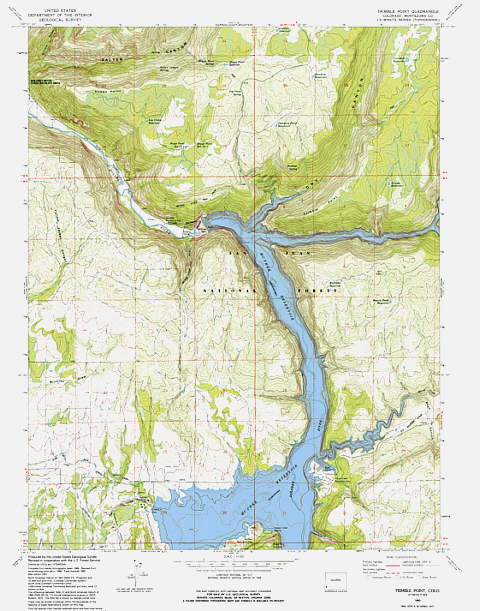
...other lakes.....
http://purplesagetradingpost.com/sumner ... Index.html
So now besides lightning strikes and solar flares I have to be watching for meteors also
 ,
,Sum
============================
Our Endeavour 37
Our MacGregor 26-S Pages
Our Trips to Utah, Idaho, Canada, Florida
Mac-Venture Links
-
robbarnes1965
- Captain
- Posts: 563
- Joined: Thu Apr 03, 2008 7:58 am
- Sailboat: MacGregor 26M
- Location: (BYC)Montreal, Qc Macgregor 26m-2007 "Miss Coco" - after my daughter, 50hp Honda
Re: Sailing with technology - Ipad
With all of us boating now with all manner of gps systems, it would be really cool to have a way to record and upload depth data along with the corresponding gps locations to crowd-source really accurate, detailed charts.
-
Russ
- Admiral
- Posts: 8312
- Joined: Thu Oct 11, 2007 12:01 pm
- Sailboat: MacGregor 26M
- Location: Bozeman, Montana "Luna Azul" 2008 M 70hp Suzi
Re: Sailing with technology - Ipad
We have the exact opposite. The lake where we boat is fairly large, yet there are no charts, maps or anything for it. Our GPS has some nice detailed charts. No paper chart option for us, not that we really need them, but it would be nice to know where depths are.Phil M wrote:More realistically, I was referring to replacing paper charts with electronic tablets. If the electronic version does not exist, as in 99% of the freshwater lakes where I live
--Russ
-
fishheadbarandgrill

- Captain
- Posts: 501
- Joined: Fri Apr 23, 2010 6:08 pm
- Sailboat: Other
- Location: Isle Of Palms, SC - 2000 Catalina 380 "Interlude"
-
Russ
- Admiral
- Posts: 8312
- Joined: Thu Oct 11, 2007 12:01 pm
- Sailboat: MacGregor 26M
- Location: Bozeman, Montana "Luna Azul" 2008 M 70hp Suzi
Re: Sailing with technology - Ipad
Canyon Ferry Lakefishheadbarandgrill wrote:What's the name of the lake?
http://goo.gl/maps/KHtVj
Here we are in the middle of the lake
http://goo.gl/maps/nkKcG
--Russ
-
Sumner
- Admiral
- Posts: 2375
- Joined: Sun Jan 04, 2009 3:20 pm
- Sailboat: MacGregor 26S
- Location: SE Utah
- Contact:
Re: Sailing with technology - Ipad
Russ look at the topo's of the lake. A lot of lakes show the elevation contours before the lake was formed if man-made and some natural lakes like Yellowstone show the contours. You have to adjust if the lake level is up or down, but still the contours give you a good idea of the bottom and where there are shelves going out that might be good anchorages. I have Yellowstone and others converted for use with SeaClear and OpenCPN. They won't work with a commercial plotter. You could print them just for reference. Best part is they are all free to download or you can buy them,RussMT wrote:We have the exact opposite. The lake where we boat is fairly large, yet there are no charts, maps or anything for it. Our GPS has some nice detailed charts. No paper chart option for us, not that we really need them, but it would be nice to know where depths are.Phil M wrote:More realistically, I was referring to replacing paper charts with electronic tablets. If the electronic version does not exist, as in 99% of the freshwater lakes where I live
--Russ
Sum
===================================
Our MacGregor 26-S
Our Endeavour 37
Our Trips to Utah, Idaho, Canada, Florida
Mac-Venture Links
-
Crikey

- Admiral
- Posts: 1833
- Joined: Sun Apr 17, 2011 12:43 pm
- Sailboat: MacGregor 26M
- Location: Washago, Muskoka, Ontario, Canada, Earth, Singularity.Suzuki DF60A. Boat name: Crikey!
Re: Sailing with technology - Ipad
Luckily, we sail on lakes with US water borders (Ontario, Erie, Huron) and can download completely capable maps courtesy of the US NOAA site, free of charge. Our system wants to charge $75 for an area package on a DVD. It's great when you can download both raster and vector maps of the same place you want to go to, and alternate between them on your plotting system.
-
prishi

- Chief Steward
- Posts: 75
- Joined: Sat Jan 28, 2012 7:45 pm
- Sailboat: MacGregor 26M
- Location: Suffern, NY
- Contact:
Re: Sailing with technology - Ipad
Phil M wrote:Although I am specifically referring to the Ipad3 with is GPS capability, any similar device will do. The old rule of thumb to always carry paper charts as a backup in case something goes haywire with your chartplotter - is no longer valid. The electronics for the IPad are completely independent of the chartplotter, and if something goes wrong with your boat's electronic systems, your IPad is the backup. Add in such things as Active Captain, and the ability to hold many dozens of paper charts in one device, the argument can be made that such a tablet is BETTER than having paper charts stashed in a locker somewhere down below.
Since this is about sailing with technology, you should have a 'technology answer' -- "It depends".
Happy Sailing!
-
RobertB

- Admiral
- Posts: 1863
- Joined: Sun Jun 05, 2011 7:42 pm
- Sailboat: MacGregor 26M
- Location: Clarksville, MD
Re: Sailing with technology - Ipad
I will thank my wife for you - she for many years (until recently) was the NOAA contracting officer responsible for contracting for both the survey work and the generation of the maps.Crikey wrote:Luckily, we sail on lakes with US water borders (Ontario, Erie, Huron) and can download completely capable maps courtesy of the US NOAA site, free of charge. Our system wants to charge $75 for an area package on a DVD. It's great when you can download both raster and vector maps of the same place you want to go to, and alternate between them on your plotting system.
-
Crikey
- Admiral
- Posts: 1833
- Joined: Sun Apr 17, 2011 12:43 pm
- Sailboat: MacGregor 26M
- Location: Washago, Muskoka, Ontario, Canada, Earth, Singularity.Suzuki DF60A. Boat name: Crikey!
Re: Sailing with technology - Ipad
I'm hoping that Windows 8 is compatible with my dated Polar Navy software. Several have talked about Navimetrics (?) but it needs to be touchscreen.
Never met a map I didn't like
Never met a map I didn't like