Highlander wrote: ↑Tue Dec 24, 2019 10:01 am
I believe I cleared old cookie,s & deleted old book mark then clicked on that one u r talkin about
or r u just out fishin again
J
No, your on the right track John, I think what happened to me is that I was trying to get to the OTHER site and I got redirected to THIS site - so my cookies were stored in the wrong cookie jar?? (I'm not very smart about websites )
All I know is that each cookie belongs to a specific cookie jar and if you don't have the right cookie jar your cookie will not work, (or something like that - it's because in the old days EVERYONE could see ALL your cookies so spies could see everywhere you have been and what websites you go to but some sites now load site specific cookies that will only reveal their secrets to specific websites (cookie jars). So now you can have a rash of cookies that don't work
I think in the Matrix the Oracle gave Neo a new cookie to eat so that he would be able to find her in the future - I guess the Oracle used the special cookies.
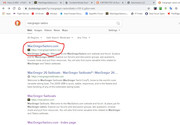
I don't use Google search because of their tracking policies. Instead, I use Duckduckgo as my primary search engine. But yes, the first result that Google returned for you is the correct URL. Below is a similar result from Duckduckgo.
Duck Duck go is a search engine like Google, with no tracking. So when you are searching for embarrassing stuff, use this one so mother G doesn't have a record of it.
Russ wrote: ↑Tue Dec 24, 2019 11:55 am
Duck Duck go is a search engine like Google, with no tracking. So when you are searching for embarrassing stuff, use this one so mother G doesn't have a record of it.
BOAT wrote: ↑Tue Dec 24, 2019 1:11 pm
Maybe I should do that - tell me though - if the duck duck is not supposed to remember who you are how can it remember the MacGregor site?
Do you need to relog every time?
Your browser (Chrome, Safari, Firefox, IE) uses cookies from the site to keep you logged in. The "remember me" cookie only works for secure HTTPS connections. So if you have a bookmark without the S, it won't remember you.
Duck Duck go is a search engine (like Chrome, Safari etc.) that doesn't remember what you searched for. Different thing.
Man! I am stupid. I don't really get it - I wanted to use the duck so that there was no record of where I have been on the internet. Not sure how to do that.
BOAT wrote: ↑Fri Jan 03, 2020 4:13 pm
Man! I am stupid. I don't really get it - I wanted to use the duck so that there was no record of where I have been on the internet. Not sure how to do that.
Not sure what you’re asking, BOAT, but you can use Privacy Mode in Windows if you don’t want your own computer to remember where you’ve been. I think CTL-Shift-P opens a ‘private’ window in Firefox. Other browsers have something similar, and I believe Macs also have something equivalent.
That’s not the same thing as Google remembering what you’ve been searching for, which is what Duck Duck Go is for - but that’s a web search engine that claims to not store and sell your search history like Google does. I think.
I’ve never looked into it, but there are ways to make yourself and your computer anonymous. But now we’re getting into Girl With The Dragon Tattoo territory.
This is way above my pay grade, so hopefully someone who actually knows something can fill in the gaping gaps.
Virtually nothing on the internet or on your computer is done in private. For the most part, your computer tracks everything you do and so does the internet.
Your computer logs stuff you do, what sites you've visited, stuff you delete. Even deleting stuff doesn't delete it. There is a whole branch of computer science devoted to forensic analysis. I had a friend in the FBI explain some of the tools they have to recover deleted files off a computer. Even emptying recycle bin leave traces they can recover. It's quite fascinating how they do it. There are software programs that will deep erase files to "military specs". They write random stuff to the drive and erase it over and over until it's no longer recoverable. Kind of like scribbling over notes on paper.
Your browser by default records you "history". This is done so you can revisit a site easily. Windows also keeps a hidden record of sites you visit, even if you delete your browser history. Most browsers have a "private" mode that doesn't keep a trail of where you've been or cache site data like images. This is good when you are searching for a new job from your work computer and don't want the boss to see it in your history. If your office uses a proxy server, all your browsing will still be recorded there, so stay off the porn sites.
Then there is GOOGLE. The big daddy of the internet. Most of us use google products. They are free and arguably some of the best tools on the internet. Google wants you to use their stuff, that's why it's free. They also mine your internet behavior and sell it.
Google is now a verb. We use it in place of the word "search".
And Google records EVERYTHING we do with their products. They don't do anything nefarious with this data (although some people would argue they do) However, some people don't like them having it. Google email (gmail) is a great product that does a fine job of spam filtering. But know that they can scan your emails and mine it for information about you.
Why would they do this? So they can "service" you better and sell your information to advertisers. That's how google makes $billions. If you search for "toenail fungus" and visit the Mayo Clinic, google realizes that you probably have an interest in toenail fungus and will direct ads for toenail fungus creams to your browser. Gee, what a coincidence that I search for toenail fungus and an ad for Fungi Cure shows up.
They also learn about other things about you, like the fact that you must own a boat. Maybe even a Macgregor sailboat. So when you search for things they can provide better results based on your boat ownership.
They know all this because we voluntarily provide it in different ways. If you have a google gmail account, they know who you are by setting cookies They can also track your IP address. Every internet connection has an IP address and google tracks this. And they keep track of where you visit and what you search for. They can even scan your gmail emails for information about you.
For some people, this creeps them out. They don't want big daddy knowing so much about them even if it helps big daddy serve them better.
So for those people there are things you can do to protect your online privacy.
1) Use private/incognito mode. Virtually every modern browser has this capability. Chrome (3 dots upper right, select incognito mode)
This sets no cookies or records where you've been. So things like "remember my password or login" won't work. It's not totally private, but at least more private.
2) Use a search engine that doesn't track your searches. Duck Duck go is one of the most popular.
3) Don't use an email from someone who tracks you like Google or Microsoft (Hotmail)
4) Use a VPN. This is a tool that hides your IP address so trackers will track you to an anonymous service provider, not your house/office.
VPNs are also a good idea if you are using an open WiFi connection and don't want bad guys in the room seeing your internet traffic (eg: coffee shop). It adds encryption to your connection and will slow it down a bit which is the cost of adding more privacy.
Bad guys know all this stuff. They even know how to destroy data on their computers. Sometimes it requires drilling holes through the drive media to physically destroy it.
So there you go BOAT. If you got this far, you now should have a better understanding of internet privacy. BTW, this forum tracks the fact that you have been here.


 )
)