Page 2 of 3
Re: What size for cockpit display?
Posted: Fri Apr 19, 2013 5:47 pm
by Russ
BOAT wrote:I guess seahouse is right - I should be carefule about getting too much bulk on the wheelhouse. Maybe I should just shop for a 5 inch display. (Geeze!) I would like a depth sounder but I could care less about a fish finder. (I don't fish). Are they mutualy exclusive or is depth sounding mean your just gonna pay for fishys anyways?
Mine is very conveniently located on the ped. Cant' imagine it anywhere else. It's perfect.
It is a chartplotter, depth finder, fish finder, weather map display and is also capable of interfacing with my motor to display real time fuel usage and actual RPMs. Love that little thing up there.
Charts have nav charts, aerial display, underwater "fish eye" view. Cool stuff. Also has tides and sunrise/set info. Cool little device.
I never use the fish finder, but it is programmable for the transducer offset and gives me water temp readings. Nifty little device. I come from old school charts and remember the "spinner" depth finder. BTW, this thing goes nostalgic and will display that "spinner" if you want.
Re: What size for cockpit display?
Posted: Fri Apr 19, 2013 5:56 pm
by BOAT
Okay Russ, you sold me - so model do you have?
Re: What size for cockpit display?
Posted: Fri Apr 19, 2013 7:36 pm
by yukonbob
Mine is also on the ped, and it swivels 360. Almost always have it on split screen depth/bottom, and gps map on the other side...
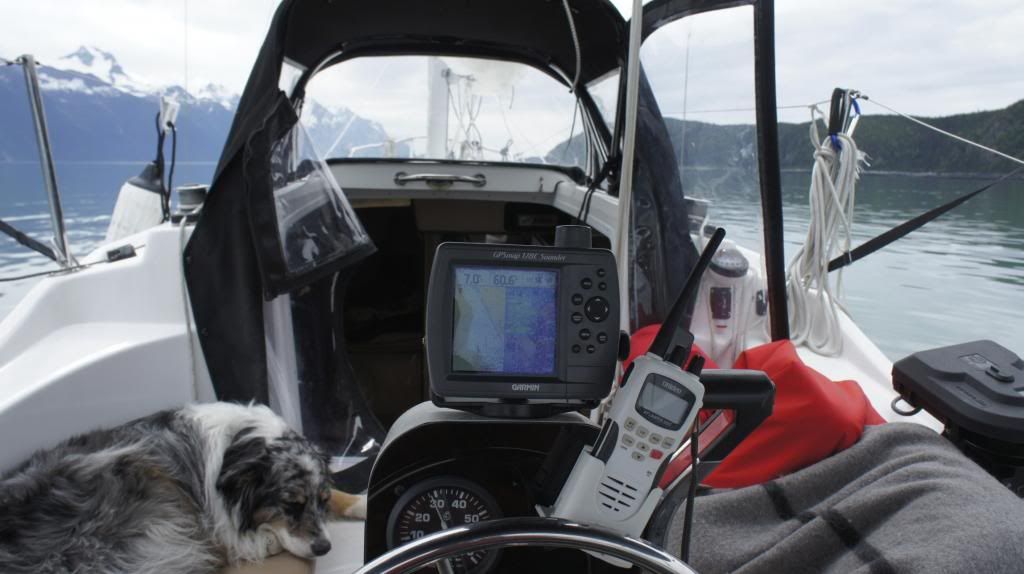
178c garmin i believe.
Re: What size for cockpit display?
Posted: Fri Apr 19, 2013 8:21 pm
by BOAT
Okay, so you have the 4 inch display - that a noce compact package I must admit - I like it. The puppy looks very comfortable.
Re: What size for cockpit display?
Posted: Fri Apr 19, 2013 8:49 pm
by Russ
I have the Garmin 440S GPS Map. Came preloaded with all blue water coastal charts. It's 5 years old now, there are newer better models out. Some like other brands better. I would suggest a visit to West Marine and check 'em out. I find mine super easy, but I've heard some complain that it's difficult compared to their brand.
Re: What size for cockpit display?
Posted: Fri Apr 19, 2013 9:18 pm
by Chopper Pilot
I have the 740S. I love it. It dims automatically as it gets dark. It is compatible with weather overlay as well as radar. I like that for when I get back to the states for "The Great Loop" and the Bahamas. It is touch screen so when I see what I want on the screen, I touch it, not the button next to it.
http://www.youtube.com/watch?v=elezNXy-nWM
That is a very short video of the GPS. I love it here in Hawaii. We have reefs that reach up 30 to 50 ft to just inches below the surface. I can just watch my position relative to them with this zoomed in.
Re: What size for cockpit display?
Posted: Fri Apr 19, 2013 9:55 pm
by rwmiller56
I have an old GPSMap 276C, that has served me well for quite some time. As far as the display size, I'm OK with the 3 3/4" display. I feel that anything larger might clutter up the pedestal. I wear bifocal sunglasses, so reading the display is not a problem

The VHF radio DSC function is wired to the GPS, and that works well. One feature I really like is the self contained battery. If I lose power, I can still have a few hours of battery time to navigate.
http://s813.photobucket.com/user/rwmill ... sort=3&o=5
Re: What size for cockpit display?
Posted: Fri Apr 19, 2013 9:57 pm
by rwmiller56
Chopper Pilot wrote: We have reefs that reach up 30 to 50 ft to just inches below the surface. I can just watch my position relative to them with this zoomed in.
Be careful on the reefs there. The PO of my boat lived in Hawaii, and he holed the hull on a reef. He was up front about it when he sold me the boat. And I have to admit that the shop did a very nice job on the fiberglass repair.
Re: What size for cockpit display?
Posted: Fri Apr 19, 2013 10:35 pm
by mastreb
You MUST put the chart-plotter atop the pedestal. It's the boat's dashboard, and you interact with it all the time. You also REALLY need to put a grab rail that goes well above it--every guest who comes aboard grabs the chart-plotter and tries to break it off.
I have the Garmin 421, which is now about $350 new on sale. Works perfectly well once you buy the $160 chart chip. The display works great for all the instrumentation, but it's a little bit small for charts.
I think a 540 series Garmin is probably the perfect size for the mac pedestal, and while I do lust after the 740 touch screen, I think it might be too large, and iPads have kind of changed my expectations of how a touch screen should work in ways that the Garmin touch screens do not yet do.
Matt
Re: What size for cockpit display?
Posted: Fri Apr 19, 2013 10:57 pm
by innervations
I have Raymarine A50D which is 5inch screen. I don't find the size a problem. Easy to read and you can of course zoom the charts up and down. To be honest I would find say 7inch or larger fairly intrusive in the cockpit. I sit on rear or side seats often when sailing or motoring and it is enough nuisance trying to look past the chart plotter as it is without having a larger screen. A50D is on a swivel mount so really easy when sailing sitting to windward side of helm. Just turn it around to face where ever you are seated.
I do use an iPad with Navionics HD charts for most of my navigation though. The A50D is for checking course while underway and depth.
Re: What size for cockpit display?
Posted: Fri Apr 19, 2013 11:41 pm
by yukonbob
mastreb wrote:You MUST put the chart-plotter atop the pedestal. It's the boat's dashboard, and you interact with it all the time. You also REALLY need to put a grab rail that goes well above it--every guest who comes aboard grabs the chart-plotter and tries to break it off.
I have the Garmin 421, which is now about $350 new on sale. Works perfectly well once you buy the $160 chart chip. The display works great for all the instrumentation, but it's a little bit small for charts.
I think a 540 series Garmin is probably the perfect size for the mac pedestal, and while I do lust after the 740 touch screen, I think it might be too large, and iPads have kind of changed my expectations of how a touch screen should work in ways that the Garmin touch screens do not yet do.
Matt
Where would you get said grab handle?
Re: What size for cockpit display?
Posted: Sat Apr 20, 2013 4:46 am
by JohnCFI
Has anyone else had a look at Garmin Bluechart for the Ipad/iphone. I am impressed both with quality and cost. I have in on my Iphone, I can see it would be great on an Ipad with its bigger screen..
I would also like to know if there is a ready made grab bar available for the

pedestal to protect goodies on top..
Re: What size for cockpit display?
Posted: Sat Apr 20, 2013 8:32 am
by BOAT
BWY has the grab handle - Gail has tried to sell it to me three times already but I stalled every time because I wanted a handle that goes all the way into the floor. My hope was to someday have a grab handle around the wheelhouse that was SO strong that I could hook my mainsheet block to it on days that I am sailing alone. As I eventualy found out and you all already know that is quite impossible on the M model because 30% of all the forward sail force is in the mainsheet block and it will tear the wheelhouse right out of the cockpit in a storm or even a bad jibe.
So that's out.
I guess it's gonna be another one of those "I told you so" phone callse with Gail on the grab handle - they have one that's easy to install. (But be warned Gail, I'm not giving up my bolted main for nothin!! NO SLUGS on my boat!) She keeps trying to get me to use slugs. I HATE slugs.
Anyways - it sounds like the 4 inch model works good but if you want to spend the money the 5 inch model is the way to go? Have I got that right?
Bluechart for Ipad?? Never heard of it! Where do I get that?
Re: What size for cockpit display?
Posted: Sat Apr 20, 2013 9:19 am
by JohnCFI
It's called Bluechart Mobile and is in the ITunes Shop. The app is free, but you pay for the charts you want. Having said that, I got the whole of S/America (inc Falklands) for about £25. Just as accurate as my Garmin GPSMap 451S or my Garmin 62S, and the charts seem to be the same as what is on my S/America SD Chip.
If I had a beef, it's that all of the Garmin chart products don't talk to each other, (I also use Garmin Homeport) but it is tricky (via SD Cards only) to get your routes/tracks from the PC or Iphone or PC. If only I could connect my on-board Laptop to NMEA2000 and use it as an intelligent system.
Sadly (as you can see) I am too far into Garmin products, to even think about moving to a rival system. On the plus, each of the components does work really well.
Search on iTunes for 'Garmin Bluechart'
Re: What size for cockpit display?
Posted: Sat Apr 20, 2013 9:35 am
by JohnCFI
PS: I'm not on a commission or anything....

