Sailing with technology - Ipad

A forum for discussing topics relating to MacGregor Powersailor Sailboats
User avatar
Phil M
Captain
Posts: 807
Joined: Sun Jun 08, 2008 9:29 am
Sailboat: Other
Location: 44' Jeanneau, Saskatoon, SK, Canada

Re: Sailing with technology - Ipad

Post by Phil M »

RussMT wrote:
Phil M wrote:More realistically, I was referring to replacing paper charts with electronic tablets. If the electronic version does not exist, as in 99% of the freshwater lakes where I live
We have the exact opposite. The lake where we boat is fairly large, yet there are no charts, maps or anything for it. Our GPS has some nice detailed charts. No paper chart option for us, not that we really need them, but it would be nice to know where depths are.

--Russ
There are no navigable charts for any lakes except for one lake, Lac La Ronge, and that chart was done with a lead sounding line. I have sailed that lake several times. We have hundreds, perhaps a thousand or so, freshwater lakes in our Canadian province of Saskatchewan. Yes, Google maps will provide an outline. The submerged rock I smashed into and tore my daggerboard keel was not shown on Google maps. :o
Powerboaters will tell you there are lots of maps with depths on it. They don't even know what a real chart looks like. Submerged rocks and reefs, bottom contours, etc., are shown on charts. :wink:
User avatar
Russ
Admiral
Posts: 8312
Joined: Thu Oct 11, 2007 12:01 pm
Sailboat: MacGregor 26M
Location: Bozeman, Montana "Luna Azul" 2008 M 70hp Suzi

Re: Sailing with technology - Ipad

Post by Russ »

Sumner wrote:
Russ look at the topo's of the lake. A lot of lakes show the elevation contours before the lake was formed if man-made and some natural lakes like Yellowstone show the contours. You have to adjust if the lake level is up or down, but still the contours give you a good idea of the bottom and where there are shelves going out that might be good anchorages. I have Yellowstone and others converted for use with SeaClear and OpenCPN. They won't work with a commercial plotter. You could print them just for reference. Best part is they are all free to download or you can buy them,
My chartplotter does a pretty good job. I bought the inland lakes SD card. Also, I've seen the lake when it was 30' down and know where the rocks are. But I'll check that seaclear stuff out. It looks interesting. And I like the free part. :wink:
User avatar
Sumner
Admiral
Posts: 2375
Joined: Sun Jan 04, 2009 3:20 pm
Sailboat: MacGregor 26S
Location: SE Utah
Contact:

Re: Sailing with technology - Ipad

Post by Sumner »

RussMT wrote:... But I'll check that seaclear stuff out. It looks interesting. And I like the free part. :wink:
I'm in the process of switching to OpenCPN. It is also free and will run all of the same stuff that SeaClear II will but is getting more and more features all of the time. Development on SeaClear is kind of dead and the code for Open is open so there are a lot of people doing plug-ins for it with more and more features all of the time.

It also run raster and vector charts and with one free plug-in will run some of the commercial (pay for them) charts for the Bahamas. Besides showing AIS it will overlay radar if one has it and....

Image

Image

... you can overlay the google earth images right on top of a NOAA chart. Plus lots more that I don't understand.

I'll still keep SeaClear on the computer and use it at times also. You can run them both at the same time if you want in different windows. Download them and play with them,

Sum

===================================
Our MacGregor 26-S

Our Endeavour 37

Our Trips to Utah, Idaho, Canada, Florida

Mac-Venture Links
User avatar
yukonbob
Admiral
Posts: 1918
Joined: Mon Feb 14, 2011 6:54 pm
Sailboat: Other
Location: Whitehorse Yukon

Re: Sailing with technology - Ipad

Post by yukonbob »

All this is great til the batteries run out…then the engine doesn't want to start. I love my chart plotter but still keep a chart book of the coast. Not the most accurate or detailed, but they will get me to and from where I need to go just in case. Another option with the tablet based is to print off the area (inland lakes ect) of where you are, and put them in a binder. Electronics always seem to have the ability to quite working just when you need them the most for whatever reason.
User avatar
Phil M
Captain
Posts: 807
Joined: Sun Jun 08, 2008 9:29 am
Sailboat: Other
Location: 44' Jeanneau, Saskatoon, SK, Canada

Re: Sailing with technology - Ipad

Post by Phil M »

Batteries are always a concern. I have found that compared to a laptop computer, tablets run much longer. Also, the instant-on and instant-off feature means you Can more easily extend the usage time if necessary.
Tablets can be charged up overnight using the boat batteries, and require very little juice to recharge. Charging your tablet about every second day is often sufficient.
User avatar
yukonbob
Admiral
Posts: 1918
Joined: Mon Feb 14, 2011 6:54 pm
Sailboat: Other
Location: Whitehorse Yukon

Re: Sailing with technology - Ipad

Post by yukonbob »

Sumner wrote:
RussMT wrote:... But I'll check that seaclear stuff out. It looks interesting. And I like the free part. :wink:
I'm in the process of switching to OpenCPN. It is also free and will run all of the same stuff that SeaClear II will but is getting more and more features all of the time. Development on SeaClear is kind of dead and the code for Open is open so there are a lot of people doing plug-ins for it with more and more features all of the time.

It also run raster and vector charts and with one free plug-in will run some of the commercial (pay for them) charts for the Bahamas. Besides showing AIS it will overlay radar if one has it and....

Image

Image

... you can overlay the google earth images right on top of a NOAA chart. Plus lots more that I don't understand.

I'll still keep SeaClear on the computer and use it at times also. You can run them both at the same time if you want in different windows. Download them and play with them,

Sum

===================================
Our MacGregor 26-S

Our Endeavour 37

Our Trips to Utah, Idaho, Canada, Florida

Mac-Venture Links
This looks real similar to the new blue charts. They also use the sat overlay on harbours and anywhere else they have images for. They also have fish view (I think thats what they call it) and is a 3D just below the water view of both below and above water for narrow channels ect.
User avatar
Sumner
Admiral
Posts: 2375
Joined: Sun Jan 04, 2009 3:20 pm
Sailboat: MacGregor 26S
Location: SE Utah
Contact:

Re: Sailing with technology - Ipad

Post by Sumner »

yukonbob wrote:....This looks real similar to the new blue charts. They also use the sat overlay on harbours and anywhere else they have images for. They also have fish view (I think thats what they call it) and is a 3D just below the water view of both below and above water for narrow channels ect.
The main difference between them, besides not having a 'fish view', is the cost. The blue charts cost money and "the other" is free. Now saying that 'the other' is a lot of time and work that most people are never going to do. I started to try to do it the other day and got lost in the downloads and trying to get the program up. I won't give up, but I think most will get the credit card out and get the blue charts 8) ,

Sum

===================================
Our MacGregor 26-S

Our Endeavour 37

Our Trips to Utah, Idaho, Canada, Florida

Mac-Venture Links
User avatar
yukonbob
Admiral
Posts: 1918
Joined: Mon Feb 14, 2011 6:54 pm
Sailboat: Other
Location: Whitehorse Yukon

Re: Sailing with technology - Ipad

Post by yukonbob »

That looks really good for a free program.
User avatar
Phil M
Captain
Posts: 807
Joined: Sun Jun 08, 2008 9:29 am
Sailboat: Other
Location: 44' Jeanneau, Saskatoon, SK, Canada

Re: Sailing with technology - Ipad

Post by Phil M »

I have made an incorrect statement in this forum on another thread regarding Active Captain, and have been informed of the error. :|

If you use a browser called Photon ( available for $5), flash can be used on the IPad.
Also, reviews can be submitted to the Active Captain database using only your IPad.

The Active Captain database, along with installed Navimatics maps and GPS, make this technology a real treat to use.

Have a good one,
Phil M
User avatar
BOAT
Admiral
Posts: 4969
Joined: Fri Oct 19, 2012 5:12 pm
Sailboat: MacGregor 26M
Location: Oceanside, CA MACMJ213 2013 ETEC60

Re: Sailing with technology - Ipad

Post by BOAT »

mastreb turned me on to an iPad app called INAVX. I downloaded it for 49 bucks and it displays the actual NOAA charts and you can load them into the iPad memory so you can use the chart without any internet access.

Much thanks to mastreb for this hint - it's a great app. The images look just like the big roll up charts I have been using for 40 years so it was easy for me to transition.
User avatar
JohnCFI
First Officer
Posts: 278
Joined: Tue Jul 17, 2012 10:44 am
Sailboat: MacGregor 26X
Location: Falkland Islands

Re: Sailing with technology - Ipad

Post by JohnCFI »

Up to now I have been using OpenCPN on a netbook connected to my Garmin GPS62S, which has been fine, except the netbook is stuck in the cabin on the table and really too far to see from the helm. Not to mention I am not too happy with the scanned charts I was given. So I decided to go the proper route, and ordered a Garmin GPSMAP451S, with a 'shoot thru the hull' depth sensor, and the Garmin Blue Chart for the East side of S/America. Probably a bit overkill, but with the added bonus the Blue Charts which I got on a Micro-SD, can be shared with my GPS62S and my Laptop as can any files from any of them (using HomePort on the Laptop). Now patiently waiting on the next cargo flight (next Weds) to get my hands on it all. Planning to take next Thursday & Friday and the weekend to get to grips with it.
User avatar
Crikey
Admiral
Posts: 1833
Joined: Sun Apr 17, 2011 12:43 pm
Sailboat: MacGregor 26M
Location: Washago, Muskoka, Ontario, Canada, Earth, Singularity.Suzuki DF60A. Boat name: Crikey!

Re: Sailing with technology - Ipad

Post by Crikey »

JohnCFI wrote:Up to now I have been using OpenCPN on a netbook connected to my Garmin GPS62S, which has been fine, except the netbook is stuck in the cabin on the table and really too far to see from the helm. Not to mention I am not too happy with the scanned charts I was given. So I decided to go the proper route, and ordered a Garmin GPSMAP451S, with a 'shoot thru the hull' depth sensor, and the Garmin Blue Chart for the East side of S/America. Probably a bit overkill, but with the added bonus the Blue Charts which I got on a Micro-SD, can be shared with my GPS62S and my Laptop as can any files from any of them (using HomePort on the Laptop). Now patiently waiting on the next cargo flight (next Weds) to get my hands on it all. Planning to take next Thursday & Friday and the weekend to get to grips with it.
Ho ... John!

When you get things up and running, give us back a few pics of what things are like sailing in the Antarctic Ocean! They say MacGregors are not blue water sailors, but you must be ridiculous down there....wow!
I'd like to know your firsthand impressions with OpenCPN.
Anywhere near Goose Green? :?
Ross
User avatar
JohnCFI
First Officer
Posts: 278
Joined: Tue Jul 17, 2012 10:44 am
Sailboat: MacGregor 26X
Location: Falkland Islands

Re: Sailing with technology - Ipad

Post by JohnCFI »

Crikey wrote: Ho ... John!

When you get things up and running, give us back a few pics of what things are like sailing in the Antarctic Ocean! They say MacGregors are not blue water sailors, but you must be ridiculous down there....wow!
I'd like to know your firsthand impressions with OpenCPN.
Anywhere near Goose Green? :?
Ross
So far all I have done is Stanley Harbour, Port William and a bit (a mile or two) into the deep blue beyond. Open CPN has been fine, except for it being in the cabin not at the helm (I guess that could be addressed), the other issue is that I am not 100% happy with the charts I was given (scanned by a friend) they are not always accurate. Later in the year (its spring here) I plan to trailer over to Newhaven, and play about in the Falkland Sound. The original owner of the 1998 :macx: used to take it from his base at Hill Cove on West Falkland and sailed all up around the Jason Islands and other western islands. He used to single hand as well. I can only hope I can become that confident and capable in time.. If I get it all wrong, I will be the first Mac to go from the Falklands to Uraguay.. :o

Goose Green is always an option (its closer than Newhaven by 20 miles) and the adventure sound and its many little Islets are an attraction, I must say.
User avatar
Crikey
Admiral
Posts: 1833
Joined: Sun Apr 17, 2011 12:43 pm
Sailboat: MacGregor 26M
Location: Washago, Muskoka, Ontario, Canada, Earth, Singularity.Suzuki DF60A. Boat name: Crikey!

Re: Sailing with technology - Ipad

Post by Crikey »

That sounds pretty awesome. I'm going to get the atlas out tonight and bone up on my geography.
I'm currently running PolarNavy chartplottingbut am thinking OpenCPN may be a better way forward for eventual touchscreen comparability with Windows 8. It seems both are only written with NMEA 0183 capability, at present.
As mine is also stuck in the cabin on a laptop, I want to experiment with a usb powered touch lcd cabled to the cockpit, which should solve the ageing eyesight problem. I could configure the maps in LARGE TEXT!
:D
If you spot any exocets, then you'll know how close to the mainland you are. :?
User avatar
Sumner
Admiral
Posts: 2375
Joined: Sun Jan 04, 2009 3:20 pm
Sailboat: MacGregor 26S
Location: SE Utah
Contact:

Re: Sailing with technology - Ipad

Post by Sumner »

Crikey wrote:...As mine is also stuck in the cabin on a laptop, I want to experiment with a usb powered touch lcd cabled to the cockpit, which should solve the ageing eyesight problem..
Here is what I've come up with...

http://purplesagetradingpost.com/sumner ... lot-5.html

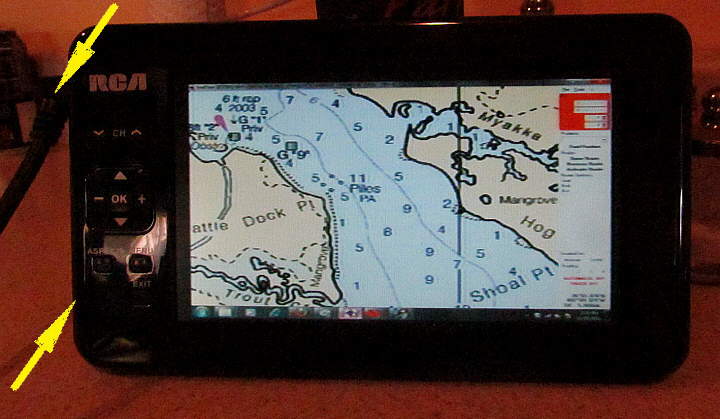
...It is pretty convoluted but cheap at not much over $100 to put together. So not much money into it if something goes wrong. It obviously is not a "marine" product. I think I'll put all of the main components in a box for a little protection and they will be in the cabin. Only the coax cable has to go to the cockpit and outside is not a problem there.

The display at 7 inches is a lot larger than most chartplotters ....

Image

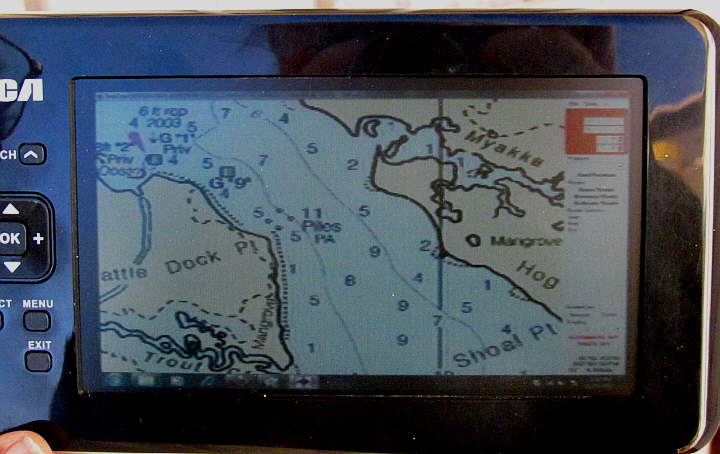
...until you get to the $1500 and up ones. The resolution is not like a monitor, but...

Image

.... still good to within a couple miles of the boats location. Above you are seeing an area of the chart of about 2 1/2 miles X 2 miles. You can still zoom in much closer than that with better detail the more you zoom in. Zoom out and the chart will start getting fuzzier. I'll still plan the route and such below in the cabin with the 16 inch computer monitor.

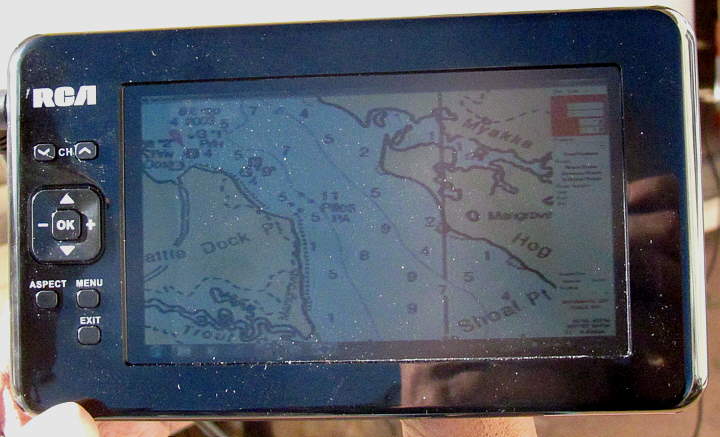
Here is what ....

Image

...the display looks like in full sun and worst case. Still viewable. Under a bimini it would be much better.. I still haven't tried it on the boat, only outdoors at home.

One thing that we have used with good luck is always having a handheld Garmin 76 B&W in the cockpit tied to the computer below with a serial cable. It is a backup to the GPS puck for position but mainly we send the trip waypoints to it before the trip via the cable and we can also go below at any time and change the route and send the new way points in a couple seconds to the handheld. The handheld doesn't have the detailed charts, but as long as we are only using it to navigate to the next waypoint it works well,

Sum

===================================
Our MacGregor 26-S

Our Endeavour 37

Our Trips to Utah, Idaho, Canada, Florida

Mac-Venture Links
Post Reply