

Jim,
Yeah, and with a fast internet connection in England and some sorta wireless link to a Mac26 with an autopilot in Jacksonville, you might just be able to remotely control your boat from across the pond....
Sumner,
I am away from my desk for a week or so, where I have my data, but I have used the Mapcal program (on SeaClear's site) to convert a jpeg and bmp picture file to a SeaClear chart. I took Google Earth pics of my neighborhood using Fn-PrintScreen on the keyboard, and my Printshop program, and then put it into SeaClear/MapCal and drove around with my laptop and SeaClear showing my icon going down and up each street where I live. A poor man's TomTom, I guess...
laptop GPS
-
c130king

- Admiral
- Posts: 2730
- Joined: Sun Nov 05, 2006 5:30 pm
- Sailboat: MacGregor 26M
- Location: Wiggins, MS --- '05 26M "König" w/ 40hp Merc
- Contact:
Re: laptop GPS
Definitely post how to upload Google Earth to SeaClear then I can "simulate" sailing in the photo of my normal sailing grounds...almost as good as being there...ok, not so almost but beggars can't be choosers.
Thanks again.
Cheers,
Jim
Thanks again.
Cheers,
Jim
-
Clemo

- Engineer
- Posts: 142
- Joined: Sat Dec 29, 2007 3:51 pm
- Sailboat: MacGregor 26X
- Location: Batemans Bay, NSW, Australia
Re: laptop GPS
Apologies first. I havn't read all posts yet, but am going to work, so just a quick spray.
I run Memory Map on an Asus 900 with a sat nav antenna.
Not in cockpi, you just can't see it in sunlight, & first laptop attempt got wet.
Asus: 12volt! So it is plugged straight into the deep cycle battery, no inverter. & robust, no moving parts!
It's good to plan your likely (& unlikely) voyages and print your route cards etc at home. We make quick notes on route cards for reference.
We use the tracker to record our voyages. It is amazingly accurate. We can read off the chart which lane of the three lane ramp we launch and retrieve from. (But I am confused be having an elevation other than "sea level")
I also use wireless internet to keep an eye on the weather. We don't watch movies on the 9inch screen - got a TV/DVD for Fridaynight Football, movies & Wii in the marina.
If I am repeating what others have said, sorry, but I genuinely recommend Asus and Memory Map. I love 'em both.
I expect that they would both be available where you are.
Got to go, C ya.
Clemo
I run Memory Map on an Asus 900 with a sat nav antenna.
Not in cockpi, you just can't see it in sunlight, & first laptop attempt got wet.
Asus: 12volt! So it is plugged straight into the deep cycle battery, no inverter. & robust, no moving parts!
It's good to plan your likely (& unlikely) voyages and print your route cards etc at home. We make quick notes on route cards for reference.
We use the tracker to record our voyages. It is amazingly accurate. We can read off the chart which lane of the three lane ramp we launch and retrieve from. (But I am confused be having an elevation other than "sea level")
I also use wireless internet to keep an eye on the weather. We don't watch movies on the 9inch screen - got a TV/DVD for Fridaynight Football, movies & Wii in the marina.
If I am repeating what others have said, sorry, but I genuinely recommend Asus and Memory Map. I love 'em both.
I expect that they would both be available where you are.
Got to go, C ya.
Clemo
-
Sumner

- Admiral
- Posts: 2375
- Joined: Sun Jan 04, 2009 3:20 pm
- Sailboat: MacGregor 26S
- Location: SE Utah
- Contact:
Re: laptop GPS
Will the computer work when the outboard is started and while the battery is being charged? I've read were some people with the Asus still have to get a 12 volt to 12 volt adapter to give the Asus a clean 12 volts and not more or less. The computer that we are building uses ......Clemo wrote:..............Asus: 12volt! So it is plugged straight into the deep cycle battery, no inverter. & robust, no moving parts!............If I am repeating what others have said, sorry, but I genuinely recommend Asus and Memory Map. I love 'em both.....Got to go, C ya...Clemo
http://www.directron.com/nf94270lf.html
......a motherboard that is Atom based like the Asus. It has some other nice features like up to 8 USB ports and comes with 2 serial com ports standard that will be nice so we can hook the handheld GPS up to to download routes to. I was going to hook up a .......
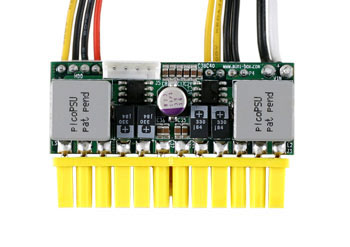
http://www.mini-box.com/picoPSU-150-XT
.......straight 12 volt power-supply to supply the 12 and 5 volts for the motherboard. Then I found out that power-supply wouldn't work in a car-like environment where the voltage can drop below 10 volts on starting and over 14 while charging.
Due to that I'm going with a ..................

http://www.mini-box.com/M3-ATX-DC-DC-AT ... tegory=981
..........power supply that will work from 6 to 24 volts. It is only a little more. Maybe of interest to some of you if you buy or have an ATX motherboard based computer (desktop) you can pull your 110 volt power supply out and plug one of the above ones in to the motherboard and be up and running on 12 volts if you are using less than 150 watts for the power supply.
c ya,
Sum
Our Trips to....
Our Mac Pages
Mac Links
-
Sumner
- Admiral
- Posts: 2375
- Joined: Sun Jan 04, 2009 3:20 pm
- Sailboat: MacGregor 26S
- Location: SE Utah
- Contact:
Re: laptop GPS
I'll try that. Maybe I'm making it harder than it is. Thanks,opie wrote:.........I am away from my desk for a week or so, where I have my data, but I have used the Mapcal program (on SeaClear's site) to convert a jpeg and bmp picture file to a SeaClear chart. .........
Sum
-
Nautek
- First Officer
- Posts: 253
- Joined: Mon Jul 14, 2008 2:55 am
- Sailboat: MacGregor 26X
- Location: Tingoora, Queensland, Australia ~ "MacSea"
Re: laptop GPS
Is anyone using C-Map ECS on a ASUS EEEPC or similar and if so did you have trouble getting it to run and what did you do to fix it?
I am thinking it has something to do with the smaller screen as it works perfectly on the laptop
Allan
I am thinking it has something to do with the smaller screen as it works perfectly on the laptop
Allan
-
Hamin' X

- Site Admin
- Posts: 3464
- Joined: Sat Aug 27, 2005 6:02 pm
- Sailboat: MacGregor 26X
- Location: Hermiston, OR-----------2001 26X DF-50 Suz---------------(Now Sold)
- Contact:
Re: laptop GPS
No need for special software, Adobe Reader has all you need.Sumner wrote:Have you tried to scan any maps and use those. You can download free USGS maps for the US in a PFD format.....
Free USGS Topo maps..
I've been trying to figure out how to get them from the PFD format to a format SeaClear can work with. I see conversion programs to go from PFD to say JPEG, but can't get further. I think there is a way and if so then I could create some inland lake maps to use with the SeaClear that might be shared. If I took the time to do one and someone else did another then we might end up with a database of inland lakes that you could navigate with SeaClear.
- 1. Download free USGS topo map for area that you want.
2. Open PDF and take snapshot of entire map using snapshot tool.
3. Saved file as BMP.
4. Move image file to the Seaclear\Charts directory where the KAP files are located.
5. Start MapCal and open image.
6. Set chart properties.
7. Convert to WCI
8. Set 4 calibration points. I used the NAD83 hash marks at the corners.
9. Set Border points.
10. Save calibration.
11. Scan for new charts. Message shows 1 new WCI chart found.
-
Sumner
- Admiral
- Posts: 2375
- Joined: Sun Jan 04, 2009 3:20 pm
- Sailboat: MacGregor 26S
- Location: SE Utah
- Contact:
Re: laptop GPS
Thanks so much. I think I'll have time tomorrow to try that. We might have to add you to our Christmas gift listHamin' X wrote:No need for special software, Adobe Reader has all you need.
~Rich
- 1. Download free USGS topo map for area that you want.
2. Open PDF and take snapshot of entire map using snapshot tool.
3. Saved file as BMP.
4. Move image file to the Seaclear\Charts directory where the KAP files are located.
5. Start MapCal and open image.
6. Set chart properties.
7. Convert to WCI
8. Set 4 calibration points. I used the NAD83 hash marks at the corners.
9. Set Border points.
10. Save calibration.
11. Scan for new charts. Message shows 1 new WCI chart found.
 , well at least send you a card
  ,
,Sum
-
Clemo
- Engineer
- Posts: 142
- Joined: Sat Dec 29, 2007 3:51 pm
- Sailboat: MacGregor 26X
- Location: Batemans Bay, NSW, Australia
Re: laptop GPS
Sumner, I have three batteries. (Traction for the outboard, lighting - parallels with the traction and a deepcycle for the fridge & computer.)
The deep cycle drives only the fridge & computer and charges from a solar panel only while on the trailer. This battery is normally disconnected from the outboard's charging circuit.
As you suggest, I would use an external regulated 12V powersupply if I was using "ship's power" or in the car. The Asus is 9V but charges with 12. I would not put 18V or more from the alternator into the little 9V computer battery, nor drop the starter onto it.
I only sail in the ocean, not on inland waters. My e-charts don't cover inland waters, so I am interested in the discussion about importing charts.
Do your topo maps have depths for inland waterways? (I'm thinking that you could use the contour lines from before a dam was flooded, but maybe a depth sounder would do the trick.)
Tks
C ya
Clemo.
The deep cycle drives only the fridge & computer and charges from a solar panel only while on the trailer. This battery is normally disconnected from the outboard's charging circuit.
As you suggest, I would use an external regulated 12V powersupply if I was using "ship's power" or in the car. The Asus is 9V but charges with 12. I would not put 18V or more from the alternator into the little 9V computer battery, nor drop the starter onto it.
I only sail in the ocean, not on inland waters. My e-charts don't cover inland waters, so I am interested in the discussion about importing charts.
Do your topo maps have depths for inland waterways? (I'm thinking that you could use the contour lines from before a dam was flooded, but maybe a depth sounder would do the trick.)
Tks
C ya
Clemo.
-
Sumner
- Admiral
- Posts: 2375
- Joined: Sun Jan 04, 2009 3:20 pm
- Sailboat: MacGregor 26S
- Location: SE Utah
- Contact:
Re: laptop GPS
Sounds like you have your power needs well thought out!Clemo wrote:...............Do your topo maps have depths for inland waterways? (I'm thinking that you could use the contour lines from before a dam was flooded, but maybe a depth sounder would do the trick.)........Tks...C ya...Clemo.
I think all of the lakes I've looked at have the contours, but there are problems with that. The contour lines can be 200 feet apart in elevation, 40 feet and maybe others, so not the depth detail you find on a navigation chart. The big problem on some of these lakes like Lake Powell where we ...........
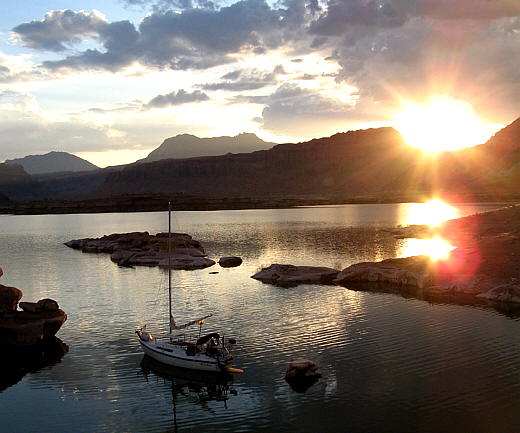
Sailing Lake Powell
.........sailed this past fall is as Calif/AZ downstream need water they draw the lake down and the level is also determined by the prior years snow pack. When we were on Lake Powell it was about 60 feet down. A couple years ago it was over 140 feet down below full pool. This results in the shore line looking a lot different on the map vs. what you are looking at. Still you can kind of take that into account and you had better be running a dept finder. One good thing is most of the western and Canadian lakes are so clear you can see 20 feet or so down.
I'm good with maps and don't really need the GPS/chartplotter to navigate on the lakes we have been on, still it would be kind of neat to have it as an option. If for some reason you had to run to someplace at night it would be a big help. You could chart the course down the deep part of the lake and download the waypoints on the handheld and work your way down the lake.
On Lake Powell with it's sheer canyon walls the main channel up to 500+ feet deep might be just a few feet off the shoreline at points. There might also be a mesa top just under the surface out in what appears to be the middle of the lake and a few feet from it the lake might be 100's of feet deep.
I'll be pretty excited if I can get the free USGS maps to work with SeaClear. Coastal maps are free and all there from NOAA along with some inland waterways and the Erie Canal.
c ya and Ruth and I hope to be over there this time next year,
Sum
Our Trips to....
Our Mac Pages
Mac Links
-
Sumner
- Admiral
- Posts: 2375
- Joined: Sun Jan 04, 2009 3:20 pm
- Sailboat: MacGregor 26S
- Location: SE Utah
- Contact:
Re: laptop GPS
Hamin' X wrote:...No need for special software, Adobe Reader has all you need.
~Rich
- 1. Download free USGS topo map for area that you want.
2. Open PDF and take snapshot of entire map using snapshot tool.
3. Saved file as BMP.
4. Move image file to the Seaclear\Charts directory where the KAP files are located.
5. Start MapCal and open image.
6. Set chart properties.
7. Convert to WCI
8. Set 4 calibration points. I used the NAD83 hash marks at the corners.
9. Set Border points.
10. Save calibration.
11. Scan for new charts. Message shows 1 new WCI chart found.

The map/chart above is Halls Crossing/Bull Frog on Lake Powell where the car ferry goes across and where we took out on our last trip and were we will put in on the next trip to try and finishing sailing the length of Lake Powell. I down loaded the free USGS map and followed your instructions. I hunted around once or twice to get going in the right direction, but the instructions were great. Thanks
.The route (red line) would be leaving from the ramp and starting up the lake towards Hite at the end of the lake. I can probably get a map downloaded, and converted to SeaClear in probably less than 10 minutes a map with a little more practice.
The only thing I couldn't figure out how to do at first from your instructions was the part after step#2 "Open PDF and take snapshot of entire map using snapshot tool." I couldn't figure out how to do step #3 "Save file as BMP". I had to open a graphics program where I had a blank page up and then pasted the image into it and then use the program to save the file as a BMP file. I'd like to get around that and see if I ended up with a clearer image.
I was trying to make it too hard. Using your instructions opens up about any place in the US, since you can download the free USGS maps and outside the USif you can find a map to the area that has some Lat/Lon markings on it.
Thanks again and I would like to know if I could use your instructions on my site and post them to others with credit to you?
c ya,
Sum
Our Trips to..
Our Mac Pages
Mac Links
-
Hamin' X
- Site Admin
- Posts: 3464
- Joined: Sat Aug 27, 2005 6:02 pm
- Sailboat: MacGregor 26X
- Location: Hermiston, OR-----------2001 26X DF-50 Suz---------------(Now Sold)
- Contact:
Re: laptop GPS
You may certainly feel free to re-post the directions and even expand upon them, Sum. They are about a freeware program that is in the public domain and I posted similar directions in the SeaClear II Yahoo groups, last year.
As far as step #3, you may need to clarify it according to your operating system. I use XP pro and when I use the snapshot tool, it is automatically saved to my clipboard as a BMP file, so I just have to paste it, using MS Office Picture Manager. Just for grins and giggles, I just tried it by pasting it into MS Paint. It was pasted as a BMP and I had the option of saving it as a JPEG, GIF, or others. Still, no special software needed. Happy to help, but YMMV.
~Rich
As far as step #3, you may need to clarify it according to your operating system. I use XP pro and when I use the snapshot tool, it is automatically saved to my clipboard as a BMP file, so I just have to paste it, using MS Office Picture Manager. Just for grins and giggles, I just tried it by pasting it into MS Paint. It was pasted as a BMP and I had the option of saving it as a JPEG, GIF, or others. Still, no special software needed. Happy to help, but YMMV.
~Rich
-
Hamin' X
- Site Admin
- Posts: 3464
- Joined: Sat Aug 27, 2005 6:02 pm
- Sailboat: MacGregor 26X
- Location: Hermiston, OR-----------2001 26X DF-50 Suz---------------(Now Sold)
- Contact:
Re: laptop GPS
Expanding on step #2, I find that you need to set the Adobe Reader zoom level to 200%, then start the snapshot tool in the lower right corner. Keep holding the left click button down, while moving the cursor to the upper left, just off the document and let it scroll to the upper left, while holding the button down. When you release the button, it may take a while for the program to acknowledge your copy, as it will be a very large file. For a good example of the detail that you will obtain, here is a link to one that I did of my local Quadrangle. Caution, it is 76 Mb:
http://i496.photobucket.com/albums/rr32 ... ldTopo.jpg
~Rich
On Edit: It appears that PhotoBucket reduces the size, so the true detail does not show.
http://i496.photobucket.com/albums/rr32 ... ldTopo.jpg
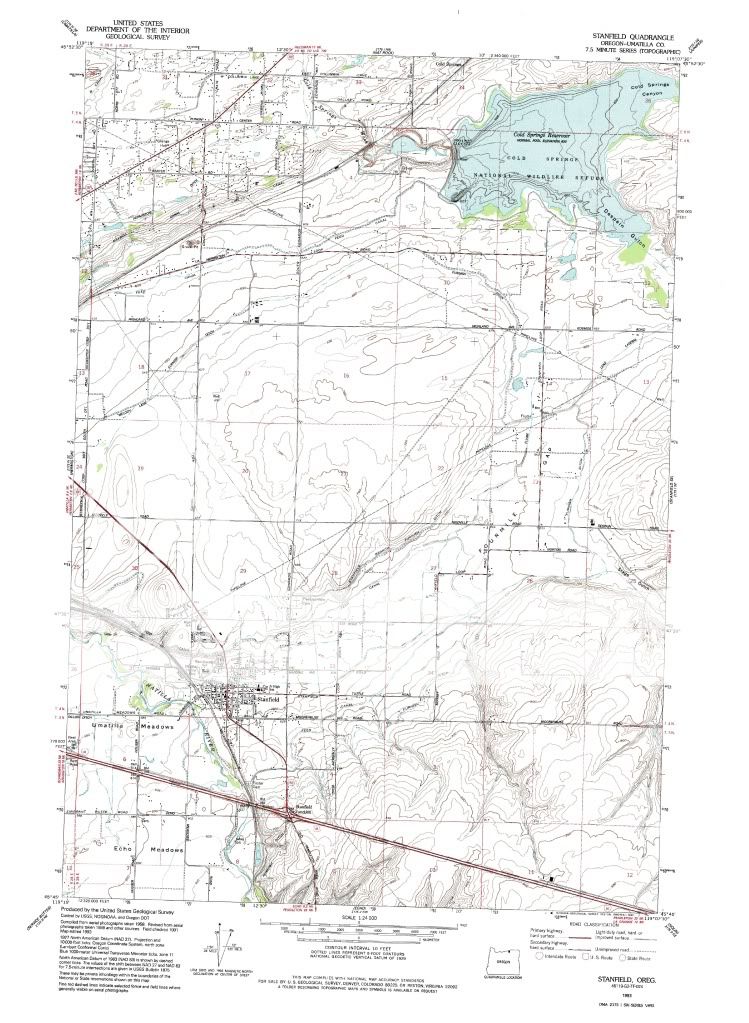
~Rich
On Edit: It appears that PhotoBucket reduces the size, so the true detail does not show.
-
Sumner
- Admiral
- Posts: 2375
- Joined: Sun Jan 04, 2009 3:20 pm
- Sailboat: MacGregor 26S
- Location: SE Utah
- Contact:
Re: laptop GPS
I had started going to 125% zoom and that seems to work well for me, but maybe I'll try higher. It is way better than the one I posted a while ago and can read the map in SeaClear to the highest zoom level. Another night and I might have the upper (last 50 miles) part of the lake mapped out. I'm using the 7.5 X 7.5 topos and feel they will work fine for me. It is also moving from one to the next. Good program and good instructions.Hamin' X wrote:Expanding on step #2, I find that you need to set the Adobe Reader zoom level to 200%, ............
This is pretty neat,
Sum
-
opie
- Captain
- Posts: 895
- Joined: Tue Nov 16, 2004 5:40 am
- Sailboat: MacGregor 26X
- Location: Wilmington, NC
Re: laptop GPS
The new 12v laptops may be what I have been looking for.... very interesting...
As for one more note from me on Seaclear...

So, yes, I have laid out my boat using a Google Earth captured picture, and now it shows my route and boat going past the London "EYE" ferris wheel on the banks of the Thames River. But, for me, it is hardly worth the effort.
Reasons:
-- A nautical chart from NOAA can cover Charleston SC to Florida in only a few hundred thousand bytes. The bmp image above is over 1.7 meg and shows only 1/4 mile. Plus NOAA charts are scale-able. I can zoom in and out to look at details with NOAA but with the above captured bmp image I can not zoom in or out without losing all detail and going pixelated.
-- Google Earth images used for navigation are very hard to read compared to the NOAA regular charts. I first figured this out when trying out the free sample of EarthNC website and their picture based nautical charts. A picture is great for looking for shoals, but for general use, the charts are superior.
-- For about $100 I am sure I could get a good chart for a nice chartplotter for the whole Thames River or for all of Lake Mead, etc. But using bmp-to-SeaClear methods would take me 30, 40 or 50 shots and a lot of time.
-- Doing the steps to get the image into Seaclear are listed by Rich and others above, but still, they are a bear of a bunch of mouse clicks and keyboard sweat.
-- My humble opinion is that doing your own Google Earth to bmp to SeaClear conversion is not worth it. For me, SeaClear is for the patient, the geeky and the cheap. I qualify on all three. For the vast majority of sailors a good commercial chartplotter and paying for charts is the way to go.
As for one more note from me on Seaclear...
So, yes, I have laid out my boat using a Google Earth captured picture, and now it shows my route and boat going past the London "EYE" ferris wheel on the banks of the Thames River. But, for me, it is hardly worth the effort.
Reasons:
-- A nautical chart from NOAA can cover Charleston SC to Florida in only a few hundred thousand bytes. The bmp image above is over 1.7 meg and shows only 1/4 mile. Plus NOAA charts are scale-able. I can zoom in and out to look at details with NOAA but with the above captured bmp image I can not zoom in or out without losing all detail and going pixelated.
-- Google Earth images used for navigation are very hard to read compared to the NOAA regular charts. I first figured this out when trying out the free sample of EarthNC website and their picture based nautical charts. A picture is great for looking for shoals, but for general use, the charts are superior.
-- For about $100 I am sure I could get a good chart for a nice chartplotter for the whole Thames River or for all of Lake Mead, etc. But using bmp-to-SeaClear methods would take me 30, 40 or 50 shots and a lot of time.
-- Doing the steps to get the image into Seaclear are listed by Rich and others above, but still, they are a bear of a bunch of mouse clicks and keyboard sweat.
-- My humble opinion is that doing your own Google Earth to bmp to SeaClear conversion is not worth it. For me, SeaClear is for the patient, the geeky and the cheap. I qualify on all three. For the vast majority of sailors a good commercial chartplotter and paying for charts is the way to go.