

Hi all knoledgable everyone
Ok new old sailor out of CT. Been a member for a few months and the information I have taken from this forum is staggering. Everyone here is great. Is that enought sucking up or is more needed? Wife and I just passed our safe boating class and are now legal boat drivers, maybe all should stay ashore next month as Moondancer gets wet by us for the first time. I am at work now and boss expects me to spend less time on computer and more on machine running. He has no sense of priorities.
In my quick search of forum I did not find any reference to someone who has hooked up a GPS antenna with assorted software and used a laptop as a chartplotter with something like Sea Clear or other program. Mostly using computer to download to a dedicated chartpotter. I bought a Hammer tablet on e-bay with GPS and chartplotter ability, but would find a laptop a whole lot easier to use.
The rum is in the refriderator ready for the rechristening and first launch. Can't wait, maybe I will sample rum to be sure it is up to snuff.
Thanks Mike
Moondancer
laptop GPS
-
moondancer
- Chief Steward
- Posts: 56
- Joined: Wed Oct 07, 2009 5:03 pm
- Sailboat: MacGregor 26M
-
c130king

- Admiral
- Posts: 2730
- Joined: Sun Nov 05, 2006 5:30 pm
- Sailboat: MacGregor 26M
- Location: Wiggins, MS --- '05 26M "König" w/ 40hp Merc
- Contact:
Re: laptop GPS
Mike,
Where will you be sailing? Any issues with shallows, rocks, channels, marshes, etc...?
The problem with laptops is they are difficult and not very practical to use in the cockpit. A helm or cockpit mounted Chartplotter is better for "real time" navigation.
I use SeaClearII at home for "planning". I use a Garmin mounted on the pedastal for sailing.
But antennas are cheap. Try The GPS Store.
Good luck with your launching of Moondancer.
Cheers,
Jim
Where will you be sailing? Any issues with shallows, rocks, channels, marshes, etc...?
The problem with laptops is they are difficult and not very practical to use in the cockpit. A helm or cockpit mounted Chartplotter is better for "real time" navigation.
I use SeaClearII at home for "planning". I use a Garmin mounted on the pedastal for sailing.
But antennas are cheap. Try The GPS Store.
Good luck with your launching of Moondancer.
Cheers,
Jim
-
Trouts Dream

- Captain
- Posts: 663
- Joined: Thu Dec 14, 2006 12:10 pm
- Sailboat: MacGregor 26X
- Location: Calgary, Alberta--1997 26X--Yamaha 90HP 2 Stroke....grunt, grunt
Re: laptop GPS
I concur that a pedastal mounted daylight visible GPS unit is the way to go. If you lake sail a hand held unit may be enough but if you sail anywhere tidal these units can be invaluable. I recently purchased the Garmin 545s when my depth sounder (original with the boat) failed. It was expensive but I would now replace it if it failed. I still have the paper charts and a backup handheld GPS in case, but some of the options on this model are awesome, such as tidal charts showing graphically where you are (rising or falling) and even airial photos of each port so I have a better idea of what it looks like before even entering.
-
Trouts Dream
- Captain
- Posts: 663
- Joined: Thu Dec 14, 2006 12:10 pm
- Sailboat: MacGregor 26X
- Location: Calgary, Alberta--1997 26X--Yamaha 90HP 2 Stroke....grunt, grunt
Re: laptop GPS
I concur that a pedastal mounted daylight visible GPS unit is the way to go. If you lake sail a hand held unit may be enough but if you sail anywhere tidal these units can be invaluable. I recently purchased the Garmin 545s when my depth sounder (original with the boat) failed. It was expensive but I would now replace it if it failed. I still have the paper charts and a backup handheld GPS in case, but some of the options on this model are awesome, such as tidal charts showing graphically where you are (rising or falling) and even airial photos of each port so I have a better idea of what it looks like before even entering.
-
verena

- Just Enlisted
- Posts: 18
- Joined: Mon May 11, 2009 10:59 am
- Sailboat: MacGregor 26X
- Location: Pacific Northwest, 1999 26X, Honda 50
- Contact:
Re: laptop GPS
Having a laptop on board is my preferred way to go. Before any trip I download the most up to date charts for FREE from NOAA. Remember that NOAA supplies charts for free, but when you buy a chartplotter you pay to have them put the free(!) charts on a proprietary chip that is very costly. Does anyone out there update their charts every time they go sailing? You could be missing out on some important information!
There are repeater screens available that are very readable in the cockpit as well as waterproof. They are costly now, but compared to buying new chips it's a big savings in the long run.
There are repeater screens available that are very readable in the cockpit as well as waterproof. They are costly now, but compared to buying new chips it's a big savings in the long run.
-
Sumner

- Admiral
- Posts: 2375
- Joined: Sun Jan 04, 2009 3:20 pm
- Sailboat: MacGregor 26S
- Location: SE Utah
- Contact:
Re: laptop GPS
I've been playing with SeaClear II at home and bought a GPS puck (USB type) and have plugged it into the desktop and laptop and it works with the SeaClear once you get the com ports figured out. Of course it doesn't show me going anywhere, but does show us in Utah  .
.
I've also hooked up the Garmin Map 76 at the same time on a different com port and have been able to download a route to it while hooked up to the GPS puck.
I'm making a chart/plotter.....
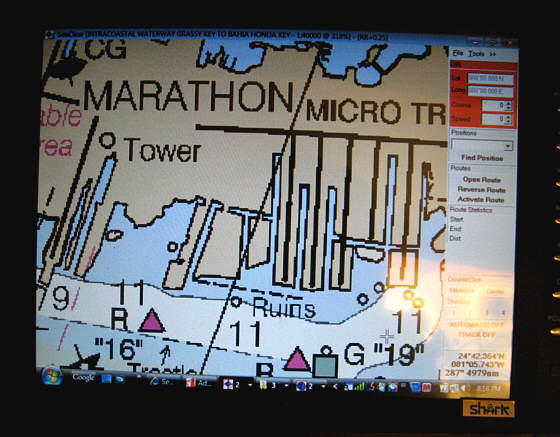
Chartplotter Build...
....where the screen will be just inside the cabin where I hope to be able to see it while underway. I'm usually up by the cabin handling the sails and Ruth is on the tiller. When we are in Florida, hopefully next fall, I'll setup routes on the chartplotter and transfer them to the handheld 76. Ruth can have it next to her if needed and I hope to be able to see the chartplotter screen in the cabin.
We will be using the NOAA charts and I have those downloaded now.
Good luck and if I can help with the GPS deal let me know,
Sum
Our Trips to Lake Powell, UT - Kootenay Lake, Canada - Priest Lake, ID
Our Mac Pages
Mac Links
.I've also hooked up the Garmin Map 76 at the same time on a different com port and have been able to download a route to it while hooked up to the GPS puck.
I'm making a chart/plotter.....
Chartplotter Build...
....where the screen will be just inside the cabin where I hope to be able to see it while underway. I'm usually up by the cabin handling the sails and Ruth is on the tiller. When we are in Florida, hopefully next fall, I'll setup routes on the chartplotter and transfer them to the handheld 76. Ruth can have it next to her if needed and I hope to be able to see the chartplotter screen in the cabin.
We will be using the NOAA charts and I have those downloaded now.
Good luck and if I can help with the GPS deal let me know,
Sum
Our Trips to Lake Powell, UT - Kootenay Lake, Canada - Priest Lake, ID
Our Mac Pages
Mac Links
-
Laika 26X

- Engineer
- Posts: 159
- Joined: Mon May 11, 2009 12:42 pm
- Sailboat: MacGregor 26X
- Location: Homeport: Mt Sinai, NY - Homewaters: Long Island Sound, Northeast USA
- Contact:
Re: laptop GPS
Like the rest...
Pedestal mount the GPS, perhaps similarto my GARMIN 540s Stow-n-go GPS Mount.
I use SEACLEAR II along with the latest Free RNCs from NOAA to develop waypoints and conduct route planning on the home pc.
I then use GPS UTILITY to convert the SEACLEAR data to a GARMIN UserData.ADM.
Due to the limitations of the 540s, I have several UserData.ADM files and swap 'em depending on the area I'm in.
The nice thing is GPS Utility will convert the UserData.ADM into a Google Earth file as well. I can see all my waypoints/routes and tracks for season. The tracks are cool as they give you a great record of where you've been.
FWIW, You can print 8-1/2 x 11 charts from SEACLEAR, place 'em in sheet protectors in a binder to keep aboard as a reference. That way you have up to date nav info always on board as well.
Sweeeeet!
"Sub" Ed
Pedestal mount the GPS, perhaps similarto my GARMIN 540s Stow-n-go GPS Mount.
I use SEACLEAR II along with the latest Free RNCs from NOAA to develop waypoints and conduct route planning on the home pc.
I then use GPS UTILITY to convert the SEACLEAR data to a GARMIN UserData.ADM.
Due to the limitations of the 540s, I have several UserData.ADM files and swap 'em depending on the area I'm in.
The nice thing is GPS Utility will convert the UserData.ADM into a Google Earth file as well. I can see all my waypoints/routes and tracks for season. The tracks are cool as they give you a great record of where you've been.
FWIW, You can print 8-1/2 x 11 charts from SEACLEAR, place 'em in sheet protectors in a binder to keep aboard as a reference. That way you have up to date nav info always on board as well.
Sweeeeet!
"Sub" Ed
-
Russ

- Admiral
- Posts: 8388
- Joined: Thu Oct 11, 2007 12:01 pm
- Sailboat: MacGregor 26M
- Location: Bozeman, Montana "Luna Azul" 2008 M 70hp Suzi
Re: laptop GPS
I have a friend with a power boat who built this "sun screen" on his flying bridge to block the light so he can see his laptop screen. This is under the bimini. It's funny to watch him hunched over the thing trying to read his display.
I have no experience with SEACLEAR, but my Garmin GPS Map 440SX is fantastic. I love this thing.
--Russ
I have no experience with SEACLEAR, but my Garmin GPS Map 440SX is fantastic. I love this thing.
--Russ
-
Nautek
- First Officer
- Posts: 253
- Joined: Mon Jul 14, 2008 2:55 am
- Sailboat: MacGregor 26X
- Location: Tingoora, Queensland, Australia ~ "MacSea"
Re: laptop GPS
Maybe the computer buffs can chime in but what if you ran a monitor off your laptop say a 7 inch to the cockpit
How far can you run an external monitor is there a maximum distance??
You could even have mouse control with a bluetooth or wireless mouse
Allan
How far can you run an external monitor is there a maximum distance??
You could even have mouse control with a bluetooth or wireless mouse
Allan
-
Duane Dunn, Allegro

- Admiral
- Posts: 2459
- Joined: Fri Jan 02, 2004 6:41 pm
- Sailboat: MacGregor 26X
- Location: Bellevue, Wa '96 26x, Tohatsu 90 TLDI and Plug In Hybrid Electric drive
- Contact:
Re: laptop GPS
I've tried about every software package out there, and I still find myself coming back to Memory Map http://www.memory-map.com . It's simple, cheap, and just plain gets the job done. I use it for all my planning and then upload/download waypoints, routes, and tracks to my Eagle chartplotter via SD memory card.
As easy as using the laptop would seem, there are a few problems I have not found acceptable solutions to in the 16 years I have been looking.
1. Most standard laptop screens are so washed out in sunlight they are unusable.
2. Stuff in the cockpit will eventually get wet.
3. At our small pedestal there is just no good way to mount a laptop. Having it loose on the seat is not acceptable to me.
So all this leads to having the laptop down below. Some accept this, but I will not accept any solution that does not provide a real time fix on a color chart at the helm.
Certainly you can remote things off the laptop, but by the time you do this the cost soon approaches a dedicated chartplotter that is made to work in the sun and is waterproof.
Daylight viewable water proof screens are not cheap and while the cabling is easy (I regularly run a projector off my laptop with a 50' VGA cable), placing one of these at the helm only solves half the problem. You still need a mouse and keyboard at the helm as well. Wireless solutions exist that will work fine (I'd use Bluetooth), but you still have these non-waterproof loose items up in the cockpit.
My laptop is usually on board during any trip along with my cheap Garmin eTrex which can cable to it as a backup, but I have not found a solution yet that would let it move into the primary navigation role on our small boats.
As easy as using the laptop would seem, there are a few problems I have not found acceptable solutions to in the 16 years I have been looking.
1. Most standard laptop screens are so washed out in sunlight they are unusable.
2. Stuff in the cockpit will eventually get wet.
3. At our small pedestal there is just no good way to mount a laptop. Having it loose on the seat is not acceptable to me.
So all this leads to having the laptop down below. Some accept this, but I will not accept any solution that does not provide a real time fix on a color chart at the helm.
Certainly you can remote things off the laptop, but by the time you do this the cost soon approaches a dedicated chartplotter that is made to work in the sun and is waterproof.
Daylight viewable water proof screens are not cheap and while the cabling is easy (I regularly run a projector off my laptop with a 50' VGA cable), placing one of these at the helm only solves half the problem. You still need a mouse and keyboard at the helm as well. Wireless solutions exist that will work fine (I'd use Bluetooth), but you still have these non-waterproof loose items up in the cockpit.
My laptop is usually on board during any trip along with my cheap Garmin eTrex which can cable to it as a backup, but I have not found a solution yet that would let it move into the primary navigation role on our small boats.
-
Trouts Dream
- Captain
- Posts: 663
- Joined: Thu Dec 14, 2006 12:10 pm
- Sailboat: MacGregor 26X
- Location: Calgary, Alberta--1997 26X--Yamaha 90HP 2 Stroke....grunt, grunt
-
Sumner
- Admiral
- Posts: 2375
- Joined: Sun Jan 04, 2009 3:20 pm
- Sailboat: MacGregor 26S
- Location: SE Utah
- Contact:
Re: laptop GPS
This is a subject that can have a 100 different good solutions for 100 different people, so I think it is pretty hard to make blanket statements as to what is good and what isn't.
At the present I think reasonable priced monitors and laptops aren't going to do very well in the cockpit for a lot of the reasons mentioned. The monitor we bought is a 12 volt monitor and a lot of people use them in cars, but it doesn't hack it out in direct sunlight. For us is that a big deal? No as we are perfectly satisfied with the Map76 guiding us from one way point to the next. True daylight laptop and monitor prices will come down in the future mostlikely
We came close to buying a Garmin 400 or 500 series, but finally decided to put the money into a 12 volt computer that will run on the boat's 12 volts power without inverters and hopefully the computer and monitor will run on less than 4 amps. We will probably have about the same in it as a 500 series Garmin, but it will do a lot more for us. Besides using less electricity than either of our laptops it will acting as a chartplotter, both full time and for planning and downloading routes to the handheld, it will handle our WiFi needs, will pickup and display TV when available, be used for word-processing for my trip reports on the trip, e-mail, and watching DVD movies and other computer uses.
I like maps/charts and have them for where we have sailed and where we plan on sailing. I usually know where we are using them, but when we have to navigate shallow water like in Florida I'll plot a course on the chartplotter and transfer that to the handheld (takes less than a couple minutes) and I'll have the chartplotter (computer monitor) on in the cabin at the same time. One thing that I like about planning trips with the monitor is you see much more than you can on say a 4 or 5 inch diagonal screen.
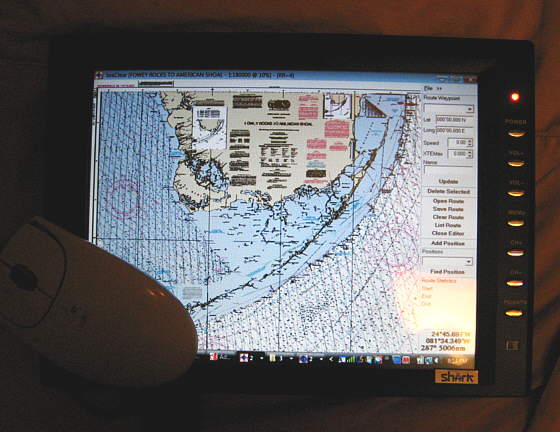
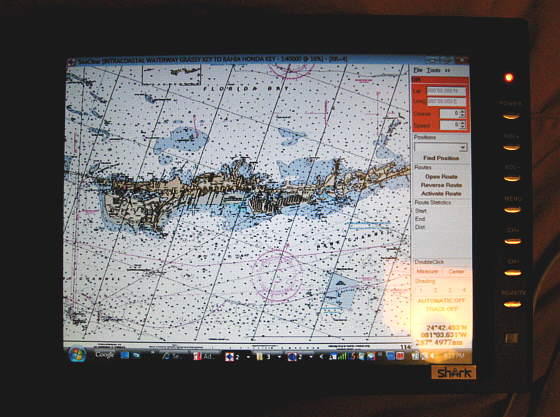
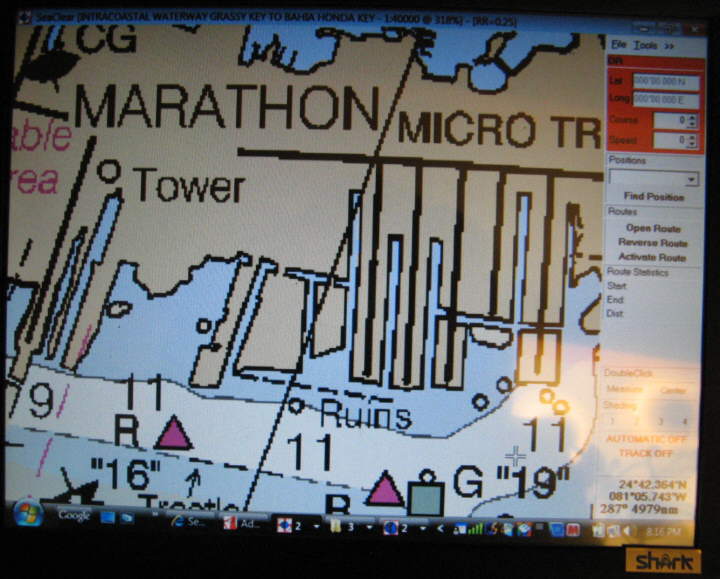
Is what we are doing for everyone? Absolutely not, but I'll bet there are some that it would work for and read on the cruising forums where a number of people are doing and have done exactly the same thing and are very happy.
Hopefully everyone will continue to share what works for them, so that those who are looking for new or different solutions for their needs will have some options to choose from.
c ya,
Sum
Our Trips to...
Our Mac Pages
Mac Links
At the present I think reasonable priced monitors and laptops aren't going to do very well in the cockpit for a lot of the reasons mentioned. The monitor we bought is a 12 volt monitor and a lot of people use them in cars, but it doesn't hack it out in direct sunlight. For us is that a big deal? No as we are perfectly satisfied with the Map76 guiding us from one way point to the next. True daylight laptop and monitor prices will come down in the future mostlikely
We came close to buying a Garmin 400 or 500 series, but finally decided to put the money into a 12 volt computer that will run on the boat's 12 volts power without inverters and hopefully the computer and monitor will run on less than 4 amps. We will probably have about the same in it as a 500 series Garmin, but it will do a lot more for us. Besides using less electricity than either of our laptops it will acting as a chartplotter, both full time and for planning and downloading routes to the handheld, it will handle our WiFi needs, will pickup and display TV when available, be used for word-processing for my trip reports on the trip, e-mail, and watching DVD movies and other computer uses.
I like maps/charts and have them for where we have sailed and where we plan on sailing. I usually know where we are using them, but when we have to navigate shallow water like in Florida I'll plot a course on the chartplotter and transfer that to the handheld (takes less than a couple minutes) and I'll have the chartplotter (computer monitor) on in the cabin at the same time. One thing that I like about planning trips with the monitor is you see much more than you can on say a 4 or 5 inch diagonal screen.
Is what we are doing for everyone? Absolutely not, but I'll bet there are some that it would work for and read on the cruising forums where a number of people are doing and have done exactly the same thing and are very happy.
Hopefully everyone will continue to share what works for them, so that those who are looking for new or different solutions for their needs will have some options to choose from.
c ya,
Sum
Our Trips to...
Our Mac Pages
Mac Links
-
opie
- Captain
- Posts: 895
- Joined: Tue Nov 16, 2004 5:40 am
- Sailboat: MacGregor 26X
- Location: Wilmington, NC
Re: laptop GPS
Sumner,
You said, "Of course it doesn't show me going anywhere, but does show us in Utah."
I want to help you get out of Utah..... So I put up some directions to help. Happy boating with SeaClear.....
Click here:
Notes for driving your Mac in Florida while sitting in Utah or wherever
You said, "Of course it doesn't show me going anywhere, but does show us in Utah."
I want to help you get out of Utah..... So I put up some directions to help. Happy boating with SeaClear.....
Click here:
Notes for driving your Mac in Florida while sitting in Utah or wherever
-
Sumner
- Admiral
- Posts: 2375
- Joined: Sun Jan 04, 2009 3:20 pm
- Sailboat: MacGregor 26S
- Location: SE Utah
- Contact:
Re: laptop GPS
Thanksopie wrote:Sumner,
You said, "Of course it doesn't show me going anywhere, but does show us in Utah."
I want to help you get out of Utah..... So I put up some directions to help. Happy boating with SeaClear.....
Click here:
Notes for driving your Mac in Florida while sitting in Utah or wherever
, that training course of yours moved me up another level. I never really understood before why you want to move the boat to some place on the chart and never tried doing what you did. I'll work on that. The more I work with the SeaClear the more I find that it has to offer. Some of you guys who have never explored the SeaClear option should check his link out.Have you tried to scan any maps and use those. You can download free USGS maps for the US in a PFD format.....
Free USGS Topo maps..
I've been trying to figure out how to get them from the PFD format to a format SeaClear can work with. I see conversion programs to go from PFD to say JPEG, but can't get further. I think there is a way and if so then I could create some inland lake maps to use with the SeaClear that might be shared. If I took the time to do one and someone else did another then we might end up with a database of inland lakes that you could navigate with SeaClear.
Thanks again for the tutorial,
Sum
Our Trips to...
Our Mac Pages
Mac Links
-
c130king
- Admiral
- Posts: 2730
- Joined: Sun Nov 05, 2006 5:30 pm
- Sailboat: MacGregor 26M
- Location: Wiggins, MS --- '05 26M "König" w/ 40hp Merc
- Contact:
Re: laptop GPS
Opie,
WAY COOL! Thanks. One thing I figured out was you have to close the route editor after you save the route. Now when I sit over here in London I can sail my boat in Jacksonville on the computer.
Excellent!
Cheers,
Jim
WAY COOL! Thanks. One thing I figured out was you have to close the route editor after you save the route. Now when I sit over here in London I can sail my boat in Jacksonville on the computer.
Excellent!
Cheers,
Jim